The database is the unsung hero of every great WordPress site. It's the central nervous system, storing everything from your latest blog post and user credentials to product inventory and contact form submissions. When it runs smoothly, your site is fast and responsive. But when it's neglected, performance grinds to a halt, security vulnerabilities appear, and the risk of catastrophic data loss becomes a real and present danger for you and your clients.
Effective database management isn't just an IT chore; it's a core component of professional web development and a critical business continuity strategy. Ignoring proper database management best practices is like building a house on a foundation of sand, eventually, it will collapse under pressure. For agencies and developers managing multiple client sites, a single database failure can ripple outwards, causing widespread downtime and damaging your reputation.
This guide provides a definitive, actionable checklist designed for WordPress professionals. We will move beyond vague recommendations to offer specific strategies, practical examples, and clear implementation steps. You will learn how to build a robust framework for:
- Automated backups and reliable disaster recovery.
- Performance tuning through indexing and query optimization.
- Hardening security with strict access controls.
- Scaling your infrastructure for high traffic and availability.
We will cover ten essential practices that form the bedrock of a secure, fast, and resilient WordPress installation. By following these steps, you can ensure your databases are not a liability but a powerful asset, driving performance and protecting your most valuable data.
1. Automated Backup and Disaster Recovery Strategy
A robust backup and recovery plan is the cornerstone of responsible WordPress database management. This practice moves beyond simple, manual backups to a fully automated system that creates redundant copies of your site’s data at multiple intervals. A solid strategy ensures that if data loss, corruption, or a security breach occurs, you can restore your site swiftly and reliably, minimizing downtime and protecting your business.
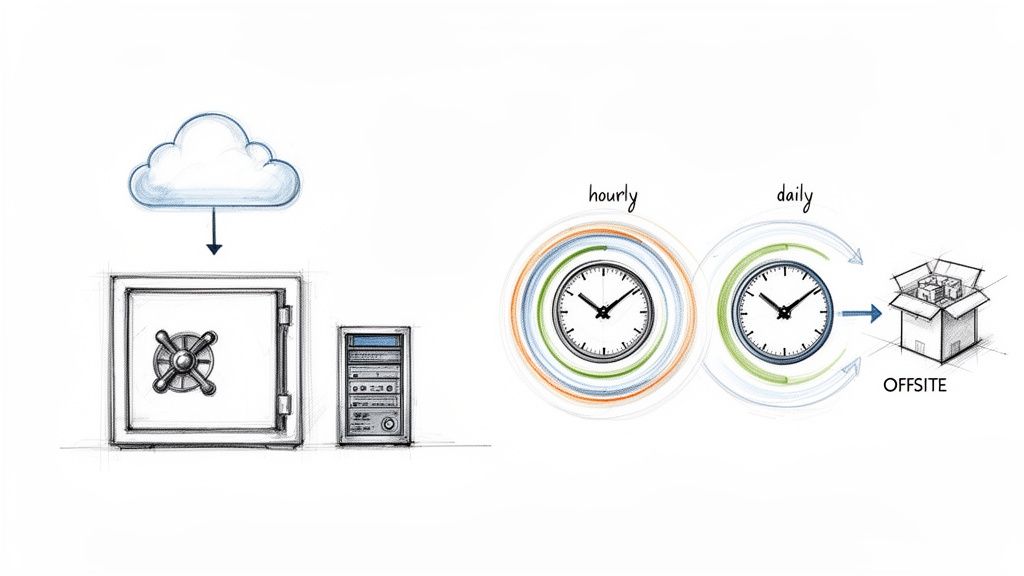
The core principle is automation and redundancy. Services like WPJack allow developers and agencies to schedule backups for multiple sites at different frequencies, such as hourly for a busy e-commerce store or daily for a corporate blog. These backups are then stored securely in offsite locations like DigitalOcean Spaces or AWS S3, providing geographic separation from the live server. Managed hosts like Kinsta and WP Engine also build their reputations on this kind of dependable, automated backup system.
Actionable Implementation Tips
Implementing an effective backup strategy involves more than just flicking a switch. To get it right, consider the following best practices for database management:
- Follow the 3-2-1 Rule: Maintain at least three copies of your data on two different media types, with one copy stored offsite. This industry standard, popularized by backup solutions like Veeam and Acronis, is critical for disaster recovery.
- Schedule Smartly: Run your automated backups during your site’s off-peak hours. This reduces the load on your server and prevents any potential performance dips for your active users.
- Test Your Recoveries: A backup is only valuable if it works. At least once a month, perform a test restore on a staging environment to confirm the integrity of your backup files and your ability to recover them.
- Automate Verification: Set up automated checks that verify the integrity of each new backup file. This helps you catch corrupted data early, long before you actually need to use the backup.
- Diversify Storage: Avoid vendor lock-in by storing your backups across different cloud providers. For instance, if your site is on DigitalOcean, consider storing backups on a separate service like Amazon S3.
Key Takeaway: An untested backup is just a hope. Regular, hands-on testing of your recovery process is the only way to guarantee you can bounce back from a disaster. For a deeper dive into tools that can help, you can explore some of the best WordPress backup plugins available today.
2. Database Performance Optimization and Indexing
A fast website relies on a fast database, and performance optimization is how you get there. This practice involves strategically improving how your WordPress site requests and retrieves information from its MySQL database. By analyzing slow queries, adding indexes to speed up lookups, and using caching to reduce the database's workload, you can significantly decrease page load times and ensure your site remains responsive, even under heavy traffic.
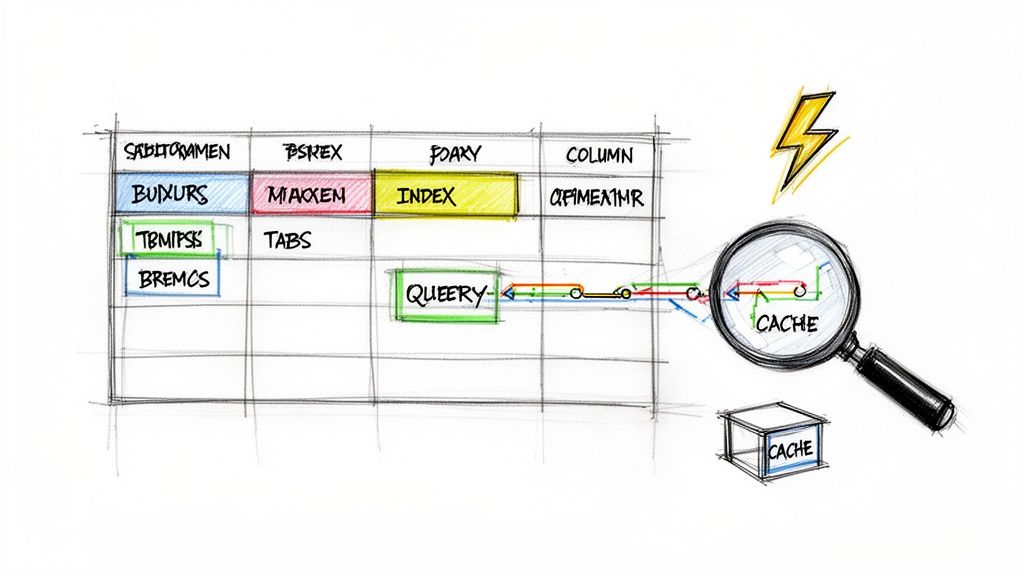
The central goal is to make every database interaction as efficient as possible. High-traffic networks like TechCrunch and large-scale platforms like WordPress.com depend on multi-tiered caching and constant query optimization. For agencies and developers, tools like WPJack simplify this by integrating a Redis object cache layer out of the box, which stores the results of common queries in memory. This prevents WordPress from repeatedly running the same expensive database operations, directly improving server response times.
Actionable Implementation Tips
Implementing performance optimizations requires a methodical approach to identifying and fixing bottlenecks. To achieve robust and efficient database management, exploring powerful methods like these database optimization techniques is paramount for ensuring speed and reliability. Consider these best practices:
- Identify Slow Queries: Use tools like the Query Monitor plugin or WP-CLI's slow query logging to pinpoint specific database queries that are taking too long to execute. This is the first step in any optimization effort.
- Implement Object Caching: Use a persistent object cache like Redis. This stores frequently accessed data, such as site options and transient API results, in high-speed memory, drastically reducing direct database hits.
- Use Database Indexing: Analyze your slow queries and add indexes to the database columns that are frequently used in
WHEREclauses orJOINconditions. An index acts like a table of contents, allowing MySQL to find data without scanning entire tables. - Perform Regular Maintenance: Run
OPTIMIZE TABLEcommands on your InnoDB tables periodically. This operation reorganizes the table and index data, which can reduce fragmentation and improve data access performance. - Analyze Execution Plans: Before deploying a code change that introduces new queries, use the
EXPLAINcommand in MySQL to see how the database will execute the query. This helps you catch inefficient queries before they impact production.
Key Takeaway: Performance isn't a one-time fix; it's an ongoing process of monitoring and refinement. Simply caching everything isn't enough. You must actively find and fix the root cause of slow queries to build a truly scalable and efficient WordPress site.
3. Principle of Least Privilege Access Control
The Principle of Least Privilege (PoLP) is a fundamental security concept that dictates a user should only have the exact permissions necessary to perform their job, and nothing more. In the context of database management best practices, this means tightly controlling who can access and modify your WordPress database. By restricting access, you dramatically reduce the potential damage from a compromised account, insider threat, or simple human error, shrinking the "blast radius" of any security incident.

This approach is not just theoretical; it's a core requirement for robust security frameworks like the NIST Cybersecurity Framework and ISO/IEC 27001. WordPress security leaders such as Wordfence and Sucuri consistently advocate for it. For instance, instead of giving every client an administrator account, you create a custom role that only allows them to edit pages and manage comments. On the server side, a separate, restricted database user is created for each application, preventing a vulnerability in one site from affecting others on the same server.
Actionable Implementation Tips
Implementing least privilege access requires a deliberate and ongoing effort. To enforce this critical practice for your WordPress sites and databases, follow these steps:
- Create Custom WordPress Roles: Avoid default roles when possible. Use a plugin like Members or PublishPress to build specific roles like "SEO Manager" or "Content Publisher" that grant only the required capabilities.
- Never Share Credentials: Every user, from developers to clients, must have their own unique account. Enforce strong passwords and Multi-Factor Authentication (MFA) on all accounts, especially for administrators.
- Use Separate Database Users: When managing multiple sites on one server, create a unique MySQL/MariaDB user and password for each site's database. This contains any potential breach to a single installation.
- Conduct Regular Audits: At least quarterly, review all user accounts and database permissions. Promptly remove accounts for former employees, clients, or any that are no longer in use.
- Rotate Credentials Systematically: Implement a policy to rotate all critical passwords and API keys, particularly after staff changes or if a potential compromise is suspected.
Key Takeaway: Granting access is easy; managing and revoking it is where real security discipline lies. Treat every permission as a potential liability and audit your access controls as diligently as you test your backups.
4. Regular Database Maintenance and Cleanup
Over time, a WordPress database naturally accumulates clutter that can slow down your site and inflate backup sizes. Regular maintenance is a non-negotiable practice for keeping your database lean and efficient. This involves systematically removing unnecessary data like post revisions, spam comments, expired transients, and orphaned metadata, which prevents performance degradation and ensures your site remains responsive.
This practice is fundamental to long-term site health, moving beyond a "set it and forget it" mentality. Managed hosts and specialized tools often perform these tasks automatically. For example, WordPress.com runs nightly optimizations, and plugins like WP-Optimize are used on millions of sites for this exact purpose. WPJack also integrates database cleanup features, allowing developers to schedule and automate these crucial maintenance routines across multiple client sites, preventing database bloat before it becomes a problem.
Actionable Implementation Tips
Implementing a consistent cleanup schedule is one of the most effective database management best practices. To build a solid maintenance routine, consider these steps:
- Schedule During Off-Peak Hours: Run maintenance tasks when site traffic is at its lowest, typically between 2-4 AM local time, to avoid impacting user experience.
- Always Backup First: Before running any optimization or cleanup process, create a full, verified backup of your database. This provides a safety net in case a cleanup script removes something critical.
- Limit Post Revisions: Control database bloat at the source by limiting the number of post revisions saved. Add
define('WP_POST_REVISIONS', 5);to yourwp-config.phpfile to keep only the last five versions. - Prune Old Data: Automate the deletion of old, irrelevant data. For instance, set up rules to remove spam or trashed comments older than 30 days and clean expired transients weekly.
- Use WP-CLI for Automation: For developers comfortable with the command line, WP-CLI offers powerful automation. Commands like
wp db optimizeorwp transient delete --expiredcan be scripted and scheduled with a cron job. You can also explore different tools and their compatibility after checking your MySQL version. - Keep a Maintenance Log: Document every cleanup action, including the date, the tasks performed, and the tool used. This log is invaluable for troubleshooting and tracking database health over time.
Key Takeaway: Proactive maintenance is far more effective than reactive fixes. A lean, optimized database directly translates to faster query times, quicker backups, and a more reliable website for your users.
5. Database Replication and High Availability Architecture
For high-traffic or mission-critical WordPress sites, a single database server represents a single point of failure. Implementing database replication and a high availability architecture is a key database management best practice that addresses this vulnerability. This approach involves creating one or more copies (replicas) of your primary database that are kept in sync, distributing the workload and providing an immediate failover target if the main server goes down.
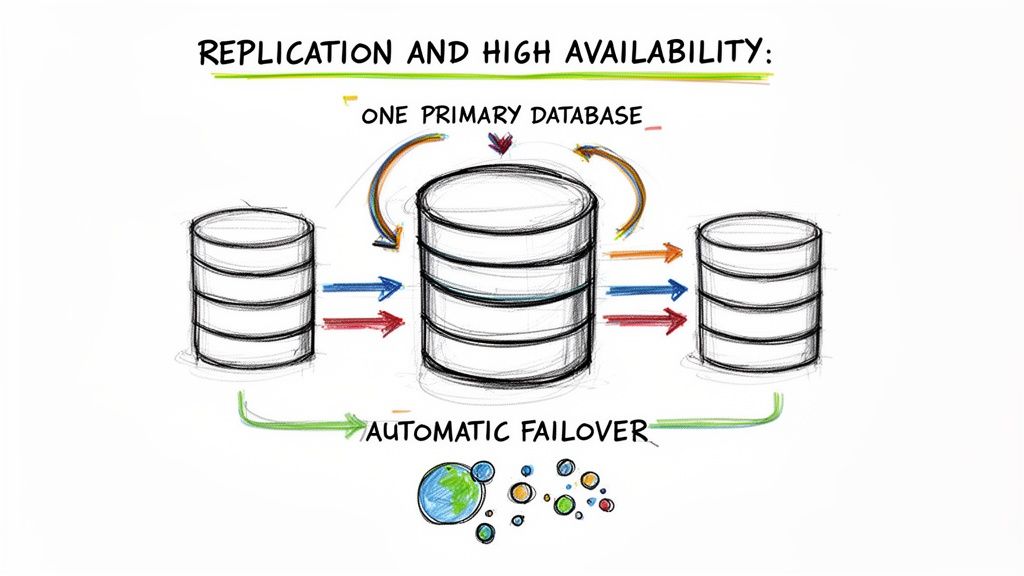
The primary-replica (formerly master-slave) model is the most common configuration. The primary database handles all write operations, which are then copied to one or more read-only replicas. This not only creates data redundancy but also allows read queries to be offloaded to the replicas, improving performance. Industry leaders like WordPress.com use this distributed architecture to serve billions of requests, while platforms like Pantheon and WP Engine build automatic failover into their managed offerings using this principle.
Actionable Implementation Tips
Setting up a resilient, high-availability database cluster requires careful planning and ongoing monitoring. To ensure your replication strategy is sound, focus on these critical actions:
- Monitor Replication Lag: The delay between a write on the primary and its appearance on a replica is called "lag." This metric should be monitored continuously and kept under one second. Tools like Percona Monitoring and Management can provide detailed insights into replication health.
- Implement Connection Pooling: Use a connection pooler and load balancer like ProxySQL or MaxScale in front of your database cluster. This intelligently distributes read queries to replicas and directs writes to the primary, all without requiring changes to your WordPress configuration.
- Test Failover Procedures: A failover plan is useless if it's not tested. At least quarterly, simulate a primary database failure in a staging environment to verify that your automatic failover mechanism works as expected and that your application can reconnect successfully.
- Use Managed Services: For teams without dedicated database administrators, managed database services from providers like DigitalOcean or AWS RDS are a great option. They handle the complex setup and maintenance of replication and failover, allowing you to focus on your application.
- Document Everything: Create clear, step-by-step documentation for your entire failover procedure. In a real emergency, having this guide readily available will save critical time and reduce the risk of human error.
Key Takeaway: High availability isn't just about uptime; it's about predictable reliability. By distributing your database load and having a tested failover plan, you transform your database from a potential bottleneck into a resilient, scalable asset.
6. Comprehensive Database Monitoring and Alerting
Effective database management best practices require shifting from a reactive to a proactive stance. Implementing continuous monitoring provides a real-time view of your database’s health, allowing you to identify and resolve potential issues long before they affect your users. This involves tracking key performance metrics and setting up automated alerts to notify you when predefined thresholds are crossed, ensuring stability and optimal performance.
This approach means you're no longer caught off guard by a slow or crashed website. Tools designed for this purpose, like the built-in dashboards in WPJack or specialized Application Performance Monitoring (APM) services such as New Relic, provide detailed graphs on CPU load, memory consumption, query performance, and active connections. This data-driven insight is essential for maintaining a high-performing and reliable WordPress site, especially for agencies managing a portfolio of client properties.
Actionable Implementation Tips
Setting up a monitoring system is the first step; configuring it for meaningful alerts is what makes it powerful. Consider these best practices for a truly effective monitoring and alerting strategy:
- Establish a Baseline: Before setting alerts, monitor your database under normal traffic conditions for at least a week. This baseline helps you define what "normal" is, so you can configure alerts that trigger on genuine anomalies, not routine fluctuations.
- Monitor Key Metrics: Focus your attention on the most critical indicators of database health: CPU usage, memory consumption, disk I/O, queries per second (QPS), and the number of slow queries.
- Configure Tiered Alerts: Don't wait for a total failure. Set up escalating alerts with multiple thresholds. For example, a warning alert at 70% CPU usage gives you time to investigate, while a critical alert at 90% signals an immediate problem that requires action.
- Log and Analyze Slow Queries: Automatically log any database query that takes longer than one second to execute. Review these logs weekly to spot inefficient code from plugins or themes that need optimization.
- Centralize Your View: For those managing multiple sites, use a unified dashboard, like those provided by WPJack or ManageWP, to see all key metrics in one place. This allows you to quickly spot which site needs attention.
Key Takeaway: Monitoring without alerting is just observation. The true value comes from automated notifications sent via Slack or email when critical thresholds are breached, empowering you to fix problems proactively before they impact the end-user experience.
7. Secure Database Credentials Management
Properly managing database credentials like passwords and connection strings is a critical, non-negotiable aspect of security. This practice involves securely storing, rotating, and controlling access to sensitive information, preventing accidental exposure in code repositories or insecure files. Adopting a secure credential management system ensures that only authorized personnel and applications can access your WordPress database, a key principle in preventing data breaches.
The goal is to decouple sensitive credentials from your application's codebase. Instead of hardcoding passwords directly into the wp-config.php file, which might get committed to a Git repository, you should use environment variables or a dedicated secrets management tool. This methodology, championed by the 12-Factor App principles and security frameworks like OWASP, allows you to manage credentials for different environments (development, staging, production) without altering code. Tools like AWS Secrets Manager or HashiCorp Vault provide centralized, auditable control, while WPJack securely injects credentials into wp-config.php on the server, keeping them out of your Git history.
Actionable Implementation Tips
Implementing secure credential management is a foundational step in hardening your WordPress site. To properly protect your database access details, follow these database management best practices:
- Never Commit
wp-config.phpto Git: This is the most common way credentials are leaked. Use a.gitignorefile to explicitly excludewp-config.phpfrom your repository. - Use Environment Variables: Define your database credentials (
DB_NAME,DB_USER,DB_PASSWORD,DB_HOST) as environment variables on your server. WordPress can then read these usinggetenv('VARIABLE_NAME')inwp-config.php. - Rotate Passwords Regularly: Change your database user passwords at least quarterly. Use a password manager to generate and store strong, random passwords of 32 characters or more.
- Restrict Database Access: When possible, whitelist the specific IP addresses that are allowed to connect to your database. For any remote administration, use secure methods like SSH tunnels instead of opening a direct public connection.
- Audit Access Continuously: Regularly review who has access to production credentials within your team or agency. Revoke permissions immediately for former employees or when they are no longer required for a role.
Key Takeaway: Your database credentials are the keys to your kingdom. Treat them as such by separating them entirely from your application code and managing them through a secure, audited system. An exposed password is a direct invitation for an attack.
8. Database Normalization and Schema Design
A well-designed database schema is fundamental to performance and data integrity, especially when extending WordPress with custom functionality. Normalization, a concept pioneered by Edgar F. Codd, involves structuring a database to minimize data redundancy and prevent update anomalies. By organizing data into logical tables and establishing clear relationships, you ensure that information is stored efficiently and consistently. This is a critical aspect of professional database management best practices.
While the WordPress core uses a flexible but somewhat denormalized structure (like the postmeta table), custom plugin and application development demand a more disciplined approach. For instance, building a custom CRM or an event management system on top of WordPress benefits greatly from normalized tables that separate customer data, event details, and ticket information. This prevents storing the same customer name in multiple places, making updates cleaner and data more reliable.
Actionable Implementation Tips
Implementing a properly normalized schema requires a thoughtful approach to data modeling. To apply these principles effectively in your WordPress projects, consider the following database management best practices:
- Understand WordPress Core: Recognize that WordPress uses an Entity-Attribute-Value (EAV) model for
postmetaandusermetafor flexibility. Avoid replicating this for structured, relational data in your own plugins. Use custom tables when you have well-defined, repeating fields. - Apply Normalization Rules (1NF-3NF): Ensure your tables adhere to at least the third normal form (3NF). This means each cell holds a single value, all columns depend on the primary key, and no non-key attribute depends on another non-key attribute.
- Choose Correct Data Types: Use appropriate data types to save space and improve query speed. Use
BIGINT(20)for IDs to match WordPress standards,VARCHARfor text with a defined limit, andDATETIMEfor timestamps. - Define Foreign Keys: When creating related tables, explicitly define foreign key constraints. This enforces referential integrity, preventing "orphaned" records, such as an order that points to a non-existent customer.
- Document Your Schema: Maintain clear documentation or an entity-relationship diagram (ERD) for your custom tables. This is invaluable for future development, debugging, and team collaboration.
Key Takeaway: While WordPress's default schema offers flexibility, building scalable custom applications requires the discipline of normalization. Use custom tables with proper data types and relationships for structured data, and reserve post meta for true "meta" information.
9. Database Version Control and Migration Management
Managing database schema changes across different environments can be a chaotic and error-prone process. Database version control introduces a systematic approach, treating your database schema like code. By tracking changes in a version control system like Git and using automated migration scripts, you ensure that every environment, from local development to production, is running the correct and consistent database structure.
This practice is essential for collaborative teams and continuous integration/continuous deployment (CI/CD) pipelines. Instead of manually running SQL queries and hoping for the best, developers commit migration scripts that are automatically tested and applied. This method prevents the common "it works on my machine" problem, where differences in database structure between developer setups and the live server cause unexpected bugs and downtime. Tools like Flyway and Liquibase have standardized this process, and the principles are adaptable to WordPress using custom scripts and WP-CLI.
Actionable Implementation Tips
To effectively implement version control for your database, you need to establish a clear and repeatable workflow. These database management best practices will help you get started:
- Version Your Schema: Use WP-CLI to periodically export the database schema (not the data) with
wp db export --no-data. Commit this schema file to your Git repository to track changes over time. - Write Granular Migration Scripts: Keep each migration script small and focused on a single change, such as adding one column or creating a new table. Name them sequentially (e.g.,
001_add_user_meta_field.sql,002_create_custom_table.sql) and store them in your repository. - Test Migrations Rigorously: Never apply a migration to production without first testing it on a staging environment that mirrors your live site. This is your chance to catch syntax errors or performance issues before they impact users.
- Always Plan for Rollback: For every migration script that applies a change (an "up" migration), you should ideally have a corresponding script that can reverse it (a "down" migration). This is your safety net if something goes wrong.
- Document Every Change: Add comments within your migration scripts or in your Git commit messages explaining the purpose and business reason for each schema modification. This documentation is invaluable for future maintenance.
Key Takeaway: Treat your database schema with the same discipline as your application code. By versioning changes and automating deployments, you transform a risky, manual task into a safe, predictable, and auditable process that is fundamental to professional development workflows.
10. Database Capacity Planning and Scalability Strategy
Effective database management best practices involve looking ahead, not just reacting to problems. Proactive capacity planning means anticipating database growth and implementing a scalability strategy before you hit resource limits. This approach prevents performance degradation, avoids emergency upgrades, and ensures your WordPress site can handle increasing traffic and data without a hitch.
For instance, a fast-growing WooCommerce store or a large Multisite network cannot afford to have its database server suddenly run out of disk space or processing power. By monitoring growth trends and planning for future needs, you can scale your infrastructure smoothly. This could involve vertical scaling (moving to a more powerful server) or horizontal scaling (distributing the load across multiple servers), ensuring a seamless user experience as your site expands.
Actionable Implementation Tips
A forward-thinking scalability plan is built on consistent monitoring and strategic decisions. To prepare your database for growth, consider these implementation tips:
- Monitor Growth Regularly: Review your database size and disk usage on a monthly basis. A good rule of thumb is to ensure your database size stays below 80% of your available disk space.
- Plan for Headroom: When provisioning resources, always plan for at least double your current database size. This buffer provides the necessary headroom to accommodate sudden traffic spikes or data influx.
- Archive Old Data: Not all data needs to be stored in your live database forever. Implement a policy to archive or delete old post revisions, transient options, and spam comment logs quarterly to keep the database lean.
- Consider Managed Databases: Services like DigitalOcean Managed Databases or Linode Database Clusters can automatically handle scaling for you. This abstracts away the complexity of managing server resources yourself. You can learn more about how platforms are incorporating auto-scaling for virtual machines to support this.
- Load Test with Realistic Data: Before a major launch or promotion, load test your environment using a production-sized copy of your database. This helps identify query performance bottlenecks that only appear at scale.
Key Takeaway: Scalability isn't a one-time fix; it's an ongoing process of monitoring, forecasting, and acting. Documenting your database's growth patterns is crucial for informing future infrastructure budgets and preventing performance surprises.
10-Point Database Best Practices Comparison
| Item | Implementation Complexity 🔄 | Resource Requirements ⚡ | Expected Outcomes 📊 | Key Advantages ⭐ | Ideal Use Cases 💡 |
|---|---|---|---|---|---|
| Automated Backup and Disaster Recovery Strategy | Moderate 🔄 — scheduling, offsite config, recovery testing | Storage, bandwidth, backup tooling, periodic testing | Rapid restores, minimal data loss, compliance evidence | Reliable recovery, reduced human error, scalable | Multi-site agencies, SLA-driven clients, compliance needs |
| Database Performance Optimization and Indexing | High 🔄 — requires DB expertise and careful tuning | Caching layers (Redis/Memcached), monitoring, occasional dev time | Lower query latency, reduced CPU/memory, better concurrency | Faster page loads, cost-efficient scaling, improved SEO | High-traffic sites, e‑commerce, content platforms |
| Principle of Least Privilege Access Control | Medium–High 🔄 — policy, role mapping, audits | IAM tools, MFA, admin time for reviews and rotations | Reduced blast radius from compromised accounts | Stronger security posture, easier audits, fewer accidental changes | Agencies, teams with many contributors, regulated environments |
| Regular Database Maintenance and Cleanup | Low–Moderate 🔄 — scheduled cleanups and optimizations | Minimal tooling, brief maintenance windows, scripting | Consistent performance, smaller backups, less bloat | Reduces storage/costs, improves restore time, automatable | Older sites, sites with heavy revisions/comments, multisite fleets |
| Database Replication and High Availability Architecture | Very High 🔄 — complex setup and failover testing | Multiple DB nodes, experienced DBAs, monitoring, extra infra | High availability, failover capability, read scaling | Minimizes downtime, supports geographic distribution | Enterprise sites, mission-critical services, high-uptime SLAs |
| Comprehensive Database Monitoring and Alerting | Medium–High 🔄 — instrumentation and alert tuning | Monitoring stack (Prometheus/Grafana, Datadog), metric storage | Early issue detection, reduced MTTR, data-driven ops | Proactive troubleshooting, capacity planning, audit trails | Multi-site operations, performance-sensitive deployments |
| Secure Database Credentials Management | Medium 🔄 — secret storage and rotation processes | Secret manager (Vault/AWS Secrets), tooling for rotation | Reduced credential exposure, auditability | Prevents leaks, simplifies rotation, supports compliance | Teams with multiple environments, regulated projects |
| Database Normalization and Schema Design | High 🔄 — careful design and testing upfront | Developer design time, schema review, query profiling | Better data integrity, maintainability; possible read trade-offs | Prevents anomalies, cleaner data model, easier extensions | Custom plugins, relational data-heavy applications |
| Database Version Control and Migration Management | Medium–High 🔄 — migrations, testing, CI/CD integration | Migration tools (Flyway/Liquibase/WP-CLI), staging environments | Consistent schemas, safe rollbacks, deployment traceability | Reduces deployment risk, enables CI/CD, audit history | Teams deploying schema changes, multi-environment workflows |
| Database Capacity Planning and Scalability Strategy | Medium 🔄 — forecasting and strategy definition | Monitoring, load-testing tools, budget for scaling | Predictable growth handling, fewer emergency outages | Cost-effective growth, planned scaling, archival options | Rapidly growing sites, stores with expanding datasets |
From Reactive Fixes to Proactive Mastery
We have journeyed through the critical pillars of modern database administration, moving beyond the surface level to explore ten foundational database management best practices. This guide was designed to be more than just a checklist; it's a strategic framework for shifting your entire operational approach. By moving from a state of reactive firefighting to one of proactive, intentional engineering, you fundamentally change the value you deliver to your clients and your business.
The practices covered, from establishing a resilient backup and disaster recovery plan to implementing the principle of least privilege, are not isolated tasks. They are interconnected components of a single, robust system. An effective indexing strategy (Practice #2) is amplified by regular maintenance and cleanup (Practice #4), while secure credentials management (Practice #7) reinforces your entire security posture. Viewing these elements as a unified whole is the first step toward true mastery.
The Shift from Management to Engineering
Adopting these principles transforms your role from a simple site manager into a performance and reliability engineer. You are no longer just fixing what breaks; you are building systems designed not to break. This proactive stance has profound benefits:
- Predictability: Instead of unexpected downtime, you have planned maintenance windows. Instead of sudden performance degradation, you have capacity plans and scaling strategies (Practice #10).
- Security: Rather than cleaning up a compromised site, you're preventing breaches through hardened access controls, secure credentials, and a deep understanding of your data schema (Practice #8). A proactive security mindset means treating it as a continuous process. For organizations looking to formalize this, engaging a dedicated vulnerability management as a service can provide expert oversight and ensure security remains a constant focus, not an afterthought.
- Efficiency: Automating backups, using version control for migrations (Practice #9), and setting up comprehensive monitoring (Practice #6) frees you from manual, repetitive work. This allows you to focus on high-value activities that grow your business.
Your Actionable Next Steps
Mastering professional database management doesn't happen overnight. It's a continuous process of refinement and implementation. Here is how you can start today:
- Conduct a Gap Analysis: Use the ten practices in this article as a scorecard. Review one of your current client sites and honestly assess where you stand on each point. Are your backups automated and tested? Is access control truly following the principle of least privilege?
- Prioritize the Biggest Risk: Identify the single greatest point of failure in your current setup. For many, this is often the lack of a tested disaster recovery plan. Make that your first implementation project.
- Embrace Automation and Tooling: Manually applying these best practices across dozens or hundreds of sites is not sustainable. This is where tools designed for professional WordPress management become essential. Platforms like WPJack are built to operationalize these concepts, turning complex tasks like setting up Redis caching, configuring off-site backups, or monitoring server health into simple, repeatable actions.
The ultimate goal is to build a foundation of trust. Your clients rely on you not just to keep their websites online, but to ensure they are fast, secure, and resilient. By systematically implementing these database management best practices, you are building a reputation for excellence and reliability. You are creating a more stable, scalable, and profitable business, one well-managed database at a time.
Ready to stop reacting and start engineering? WPJack provides the tools you need to implement these database management best practices across all your WordPress sites from a single dashboard. Sign up for WPJack today and transform your server management workflow.
Free Tier includes 1 server and 2 sites.