Picking the right WordPress hosting for nonprofits is a bit like choosing the foundation for your organization's digital home. It's not just about getting online; it's about finding that sweet spot between cost, performance, and security, especially when a big fundraising campaign is on the line. Get this right, and you'll build donor trust, boost volunteer sign-ups, and ultimately, supercharge your mission.
Why Your Hosting Choice Matters for Your Mission
Think of your website's hosting as the actual plot of land you're building on. If the ground is shaky and unstable, you're in for endless problems. But a solid foundation? That supports growth, community, and everything you want to build. Your hosting provider is that digital foundation—it dictates how stable, fast, and secure your website will be.
This decision is much bigger than just keeping the lights on. It’s a strategic move that directly impacts how you connect with supporters. Poor hosting often means a slow website, and a slow site is a surefire way to frustrate a potential donor until they give up mid-donation. Even worse, a security breach could expose sensitive donor data, causing a devastating blow to the trust you've worked so hard to build.
On the flip side, the right WordPress hosting for nonprofits is an incredible asset. It keeps your site snappy and responsive, even when a campaign goes viral and traffic surges. Most importantly, it protects your data and your donors' information, reinforcing the credibility that's absolutely essential for fundraising.
Decoding the Different Types of Hosting
The world of web hosting is full of jargon, but it’s not as complicated as it seems. Let's break it down with a simple housing analogy.
Shared Hosting: This is like renting an apartment. You're sharing the building (the server) and all its resources—power, memory, security—with lots of other tenants (websites). It's the most budget-friendly choice, perfect for brand-new nonprofits or sites with minimal traffic. The downside? A "noisy neighbor" (another site on your server getting tons of traffic) can slow everyone down.
Virtual Private Server (VPS) Hosting: Think of this as a townhouse. You’re still on the same property as others, but you have your own walled-off, dedicated space with guaranteed resources. This gives you a big boost in performance and security over shared hosting and is great for handling moderate traffic. We dive deeper into the specifics in our guide on cloud vs. VPS hosting.
Managed WordPress Hosting: This is the full-service, luxury condo experience. The "building management" (your host) takes care of all the maintenance, security, and updates specifically for WordPress. While it costs more, it saves a ton of time and technical headaches. It's the ideal choice for nonprofits that don't have a dedicated IT person but need top-notch performance and total peace of mind.
To make it even clearer, this flowchart can help you visualize which path makes the most sense for your organization's budget, size, and technical comfort level.
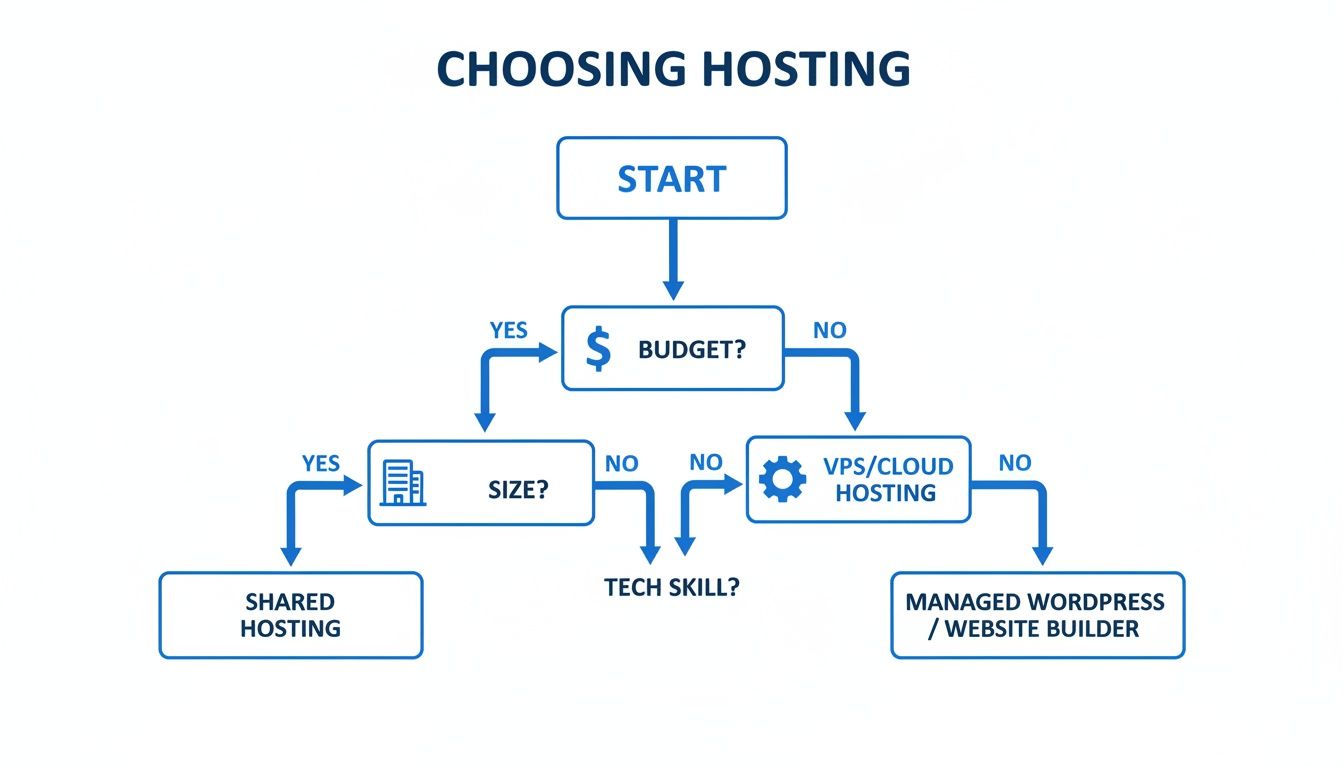
The key is to match your hosting to your current needs and goals. It’s perfectly normal to start with shared hosting and move up to a VPS or managed plan as your nonprofit grows and your needs evolve.
Which Hosting Type Fits Your Nonprofit
Use this quick comparison to find the best hosting solution based on your nonprofit's size, budget, and technical expertise.
| Hosting Type | Best For | Pros | Cons |
|---|---|---|---|
| Shared Hosting | New or small nonprofits, low-traffic sites, tight budgets. | Extremely affordable, easy for beginners. | Performance can be inconsistent, security risks from other sites. |
| VPS Hosting | Growing nonprofits, moderate traffic, more control needed. | Guaranteed resources, better performance, increased security. | Requires some technical knowledge, more expensive than shared. |
| Managed Hosting | Nonprofits without IT staff, high-traffic sites, mission-critical needs. | Top-tier performance and security, automatic updates and backups, expert support. | Highest cost of the three options. |
Ultimately, the best choice depends on where you are now and where you plan to go.
The WordPress Advantage for Nonprofits
There's a reason so many nonprofits flock to WordPress. Its sheer popularity is a huge advantage. As of 2025, a stunning 60% of nonprofits globally are running on this platform. That's no accident, especially when you consider that WordPress powers 43.3% of all websites on the internet.
For a nonprofit, this widespread adoption means access to a massive ecosystem of affordable tools. By using open-source solutions built for WordPress, organizations can cut their web development costs by 60-80% compared to building a custom site from scratch. That's a huge saving that frees up critical funds to be put directly toward your mission.
The Nonprofit Hosting Checklist of Essential Features
When you're picking out WordPress hosting for nonprofits, it's easy to get fixated on the price tag. But you're not just buying server space; you're laying the digital foundation for your entire mission. Your fundraising, outreach, and day-to-day operations all depend on it. Certain features just aren't optional. They're the guardrails that protect your organization, your donor data, and the trust you've worked so hard to build.
Think about it like setting up a physical office. You wouldn't skip installing locks on the doors, planning a fire escape route, or getting the electricity turned on. Those are basics for keeping things safe and running. The exact same logic applies to your website, your digital headquarters. This checklist will walk you through the absolute must-haves, starting with the most critical pieces: security and trust.
Unbreakable Security and Trust Foundations
Security has to be your number one priority, period. One data breach can undo years of community trust and put sensitive donor information at risk. It’s the single most important factor in your hosting decision.
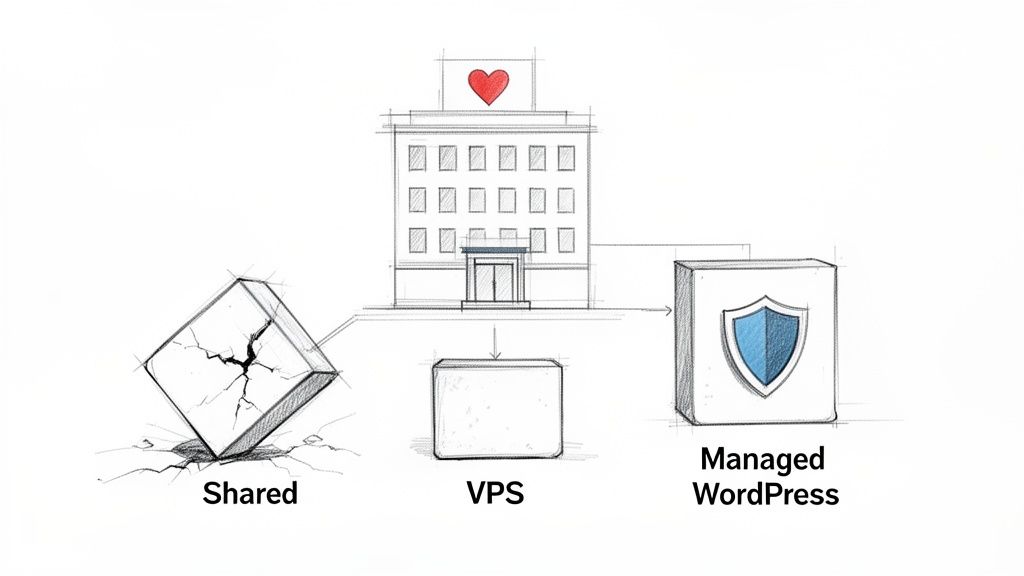
Free and Automated SSL Certificates: An SSL certificate is what encrypts the connection between a visitor's browser and your website. It's the little padlock icon and the "s" in "https" that tells people your site is secure. For any nonprofit accepting online donations, this is non-negotiable. It’s the tech that keeps a supporter's financial details safe. Any decent host provides these for free and renews them automatically.
Automated Daily Backups: Picture this: a routine plugin update breaks your site, or worse, you get hacked right before your biggest fundraising campaign of the year. Automated daily backups are your lifeline. They create a full copy of your site every single day, so if disaster strikes, you can restore a working version with just a click. Without them, you're risking total data loss and crippling downtime.
Web Application Firewall (WAF): Think of a WAF as a security guard for your website. It stands at the digital front door, filtering out shady traffic and blocking common hacking attempts and spam bots before they can even get close to your WordPress site. It's a critical layer of proactive defense.
The reality is that while website security is a massive concern, only 68% of nonprofits have a formal security plan, even though 27% have been hit by cyberattacks. That gap is precisely why you need to choose hosting that bakes security right in from the start—especially when a donor’s trust is on the line. You can find more insights about nonprofit website strategies and security trends to see just how important this is.
Performance and Reliability for Mission Success
Once you've got security buttoned up, the next job is making sure your site is fast and always online. A slow or unavailable website during a giving campaign means one thing: lost donations. It's that simple.
The bridge between all these powerful features and your team is a straightforward control panel. Let's be honest, in most nonprofits, people wear a lot of different hats, and "server administrator" usually isn't one of them. A modern dashboard, like the one we've built at WPJack, lets a program manager or marketing coordinator easily handle backups, check on security, or add a new site without ever needing to touch a command line. It lets your team get back to their real jobs.
Your hosting platform should be an enabler, not a bottleneck. Its core job is to provide a stable, secure, and fast environment so you can focus on what truly matters—driving impact and connecting with your community.
How Hosting Features Drive Nonprofit Goals
This table connects essential hosting features to tangible nonprofit outcomes, helping you prioritize what truly matters.
| Hosting Feature | Why It Matters for Nonprofits | Key Metric It Improves |
|---|---|---|
| Free SSL Certificate | Secures donation forms and protects sensitive supporter data. | Donor Trust, Conversion Rate |
| Automated Daily Backups | Provides a one-click recovery plan from hacks or errors. | Uptime, Operational Resilience |
| High Uptime Guarantee | Ensures your site is online during critical fundraising campaigns. | Donation Revenue, Reliability |
| Intuitive Control Panel | Empowers non-technical staff to manage the website confidently. | Staff Efficiency, Reduced Costs |
Seeing these features laid out this way makes it clear how technical choices directly support your mission's goals. A secure, reliable website isn't just a technical asset; it's a core part of your fundraising and community-building strategy.
Balancing Your Budget with Mission Impact
For any nonprofit, every dollar counts. That budget isn't just a spreadsheet; it's a direct reflection of your ability to serve the community. So when it comes time to choose WordPress hosting, it’s tempting to grab the cheapest option and move on. But that can be a seriously costly mistake down the road.
True value isn't about the lowest monthly price. It's about the total cost of ownership. This includes the sticker price plus all the hidden expenses that can ambush your budget. Think of it like buying a car—the cheapest model on the lot might end up costing you way more in repairs and fuel than a slightly more expensive but reliable one.
Uncovering the Hidden Costs
Many budget hosts love to lure you in with a super-low introductory offer, only to double or even triple the price when it's time to renew. This "renewal shock" can throw your whole annual budget into chaos. You've also got to account for essential features that often come with their own separate price tag.
These add-on costs pile up fast:
- SSL Certificates: Some providers charge an annual fee for this, even though it's a non-negotiable security feature today.
- Automated Backups: What seems like a basic necessity can be a premium add-on, costing you extra every month.
- Email Hosting: Want custom email addresses for your domain? That's often a separate service you have to pay for.
- Developer Fees: If your cheap hosting is slow or unreliable, you might have to hire a developer to fix performance issues or clean up after a hack. Those bills can easily run into hundreds or thousands of dollars.
When you factor in these potential expenses, it becomes clear that the cheapest plan is rarely the most affordable one.
A slightly higher investment in quality WordPress hosting for nonprofits isn't an expense; it's an investment in stability. It prevents the costly emergencies—like website downtime during a fundraiser—that can cripple your mission's momentum.
And don't forget, when you're looking at essential digital tools like hosting, exploring nonprofit technology grants can help ease the financial load and get your website the solid foundation it needs.
Predictable Pricing for Sustainable Growth
For nonprofits managing multiple projects, chapters, or campaigns—each with its own website—costs can spiral out of control. Most hosting providers charge on a per-site or even per-visit basis, making your monthly bill a moving target that's impossible to budget for.
This is where a different model brings some serious relief. A flat-rate server management platform lets you run a bunch of websites on a single server for one predictable price.
Imagine your organization has a main website, a separate site for an annual gala, and another for a new community program. With a traditional host, you could be paying for three separate plans. With a tool like WPJack, you could host all three on one powerful, low-cost cloud server, all managed through a single subscription. The savings are huge, but more importantly, they're predictable. This frees up funds that can go straight from IT overhead into your programs. If you're looking for affordable options, you might be interested in our guide on free WordPress VPS hosting.
The Long-Term Value of a Smart Investment
Let's look at a real-world scenario. A small environmental nonprofit launches a major online fundraising campaign. Their cheap shared hosting can't handle the sudden traffic spike from a social media post that goes viral. The site crashes.
The aftermath is a total disaster, both for their finances and their reputation:
- Lost Donations: Potential donors hit a broken site and just gave up.
- Emergency Costs: They had to pay a developer an emergency fee just to get the site back online.
- Damaged Trust: Supporters were left wondering if the organization was reliable.
A slightly better hosting plan would have cost a few extra dollars a month but would have saved them thousands in lost revenue and repair bills. This is what balancing budget with impact is all about—investing wisely in your foundation prevents costly disasters and makes sure your digital home is always ready to support your mission.
How Website Performance Maximizes Donations
Every single second your website takes to load is a potential donation lost. For a nonprofit, website performance isn't just some tech jargon; it's a direct line to your mission's success. A slow, clunky website creates friction for your supporters right when they feel most inspired to give.
Picture the checkout line at a busy store during the holidays. If it's long and barely moving, people get frustrated and start abandoning their carts. It's the exact same thing online. A donor clicks your "Donate Now" button, only to stare at a spinning wheel. They’re far more likely to just give up, which means lost funding and a missed chance to connect with someone who cares about your cause.
This isn't just a theory—the link between speed and engagement is real. High bounce rates, which track how many people leave after seeing just one page, are almost always a symptom of a slow site. During a big fundraising push, that's a disaster.
The Financial Impact of a Slow Website
Slow load times have a real, measurable cost. For a nonprofit, that translates directly to less money for your programs and services. The right WordPress hosting for nonprofits acts as the engine for your site, creating a fast, smooth experience that keeps your digital front door wide open for supporters.
Let’s get specific on how performance impacts your goals:
- Donor Conversion: Faster pages mean higher conversion rates on your donation forms. When the process is painless, people are way more likely to finish their contribution.
- Volunteer Sign-ups: A snappy, easy-to-use site gets more people to sign up for events and volunteer, growing your community's impact.
- Supporter Engagement: A responsive website keeps visitors around longer. That gives them more time to read your stories, understand what you do, and really connect with your mission.
Online fundraising is a huge deal for nonprofits. While 55% of donation transactions still happen on a desktop, a massive 53% of visitors are on mobile. Your hosting has to deliver a fast experience to everyone, no matter what device they're using. And get this: the average nonprofit sees 12,708 monthly visitors but only converts 1.5% of them. When you realize that poor performance causes 60-70% bounce rates, you see a problem you can actually fix with a massive payoff. Dig into more WordPress statistics for nonprofits to see the full picture.
Demystifying Performance Optimization
The good news is you don't need to be a web performance guru to have a fast site. Modern hosting and management tools do all the heavy lifting. Let's use a simple analogy for a key feature: caching.
Imagine a popular coffee shop. A smart barista knows tons of customers will order a simple black coffee. Instead of brewing every single cup from scratch, they keep a fresh pot ready to go. That's exactly what caching does for your site. It stores ready-made versions of your most popular pages so they can be delivered to visitors almost instantly, slashing load times.
Another game-changer is a Content Delivery Network (CDN).
A CDN is like having mini-warehouses for your website's content (images, files) scattered all over the world. When someone from another country visits your site, the content is delivered from the warehouse closest to them, making everything load way faster.
You can learn more in our detailed guide on the benefits of web hosting with a CDN. These tools work quietly in the background, making sure your site is always quick and reliable without you having to do a thing. It's not just about keeping the lights on; your hosting powers your outreach. For a deeper dive, check out these effective digital marketing strategies for nonprofits. When you pick the right hosting partner, these performance-boosting features are often built right in, giving you a huge head start from day one.
Streamlining Your Website Operations with Modern Tools
Knowing you need a secure, fast, and affordable website is one thing. Actually making it happen without a dedicated IT guy is a whole different ball game. For most nonprofits, the daily grind means wearing a dozen different hats with never enough time. The last thing you need is to become a part-time server admin just to keep your site from crashing.
This is exactly where the right tools make all the difference. Modern server control panels are built to strip away the complexity of website management, turning what used to be a highly technical job into a few simple clicks. Think of it as a translator between you and the server, letting you focus on your mission, not the command line.
The goal is to give your team—your program managers, fundraisers, and volunteers—the power to manage your website confidently. When spinning up a new campaign site is as easy as using any other app on your computer, you get a ton of time back and stop relying on expensive outside help.
From Zero to Launch in Minutes
Let's imagine a common scenario. An animal shelter needs to get a new WordPress site up and running for its annual adoption drive, and they need it yesterday. The campaign is time-sensitive, donor information has to be locked down, and the budget is, well, a nonprofit budget. With old-school hosting, this could take days of back-and-forth emails and technical headaches.
With a modern control panel, it’s a completely different story.
- Connect Your Cloud Provider: First, you just link your account from a low-cost cloud provider like DigitalOcean or Vultr. This gives you direct access to their powerful servers without any middleman markup.
- Spin Up a Server: With a single click, you can provision a new, optimized server in whatever location makes sense for your audience. The system handles all the heavy lifting in the background, installing and configuring the web server, database, and security rules—all perfectly tuned for WordPress.
- Install WordPress and Secure It: Next, you add your domain and click "Install WordPress." In literally under ten seconds, a fresh site is ready to go. Another click gets you a free lifetime SSL certificate, instantly securing your site for donations and volunteer sign-ups.
What was once a scary technical checklist becomes a simple, three-step process you can knock out in minutes from a single dashboard. That kind of speed is a game-changer for nonprofits that need to move fast.
The screenshot below shows just how easy it is to add a new WordPress site from one central hub.
This kind of interface takes all the guesswork out of it, letting anyone on your team launch a secure, high-performance website without needing to know a lick of code.
Scaling Your Impact Without Scaling Your Budget
This is where things get really interesting, especially for larger organizations or the agencies that help them. Think about a national nonprofit with local chapters that all need their own websites. Or a web agency trying to manage sites for a dozen different nonprofit clients. The costs and the management headaches can spiral out of control fast.
A flat-rate management tool completely changes the math. Instead of paying a separate hosting fee for every single website, you can run tons of sites on one powerful server for a single, predictable monthly price. The cost savings are huge, and management becomes dead simple.
A flat-rate management platform transforms your approach from paying per-site to paying per-server. This shift allows you to host numerous campaign sites, chapter pages, and event microsites without seeing your monthly hosting bill explode.
That financial predictability is a lifesaver for nonprofits. It means you can actually budget for your web costs, freeing up money that can go from administrative overhead straight to your programs. You can say "yes" to new digital ideas without worrying about the cost, which helps you innovate and grow your reach.
Ultimately, the right WordPress hosting for nonprofits, powered by the right tools, isn't just an expense—it's a strategic asset that helps you make a bigger impact.
Frequently Asked Questions About Nonprofit Hosting
Diving into WordPress hosting for nonprofits always brings up a few common questions. Let's clear the air and get you some straightforward answers so you can make a choice that fits your mission and your budget.
Can Our Nonprofit Get WordPress Hosting for Free?
You'll see providers offering "free" plans, but there's almost always a catch. These plans are usually very limited in performance and storage. Worse, they might plaster their own ads on your website, which doesn't exactly scream professionalism when you're trying to build trust with donors.
A much better approach is to find truly affordable, high-value hosting. You can use a simple tool to manage a low-cost cloud server that gives you professional-grade power and full control for just a few dollars a month. It’s a smarter investment than getting tangled up in a restrictive "free" plan.
Do We Need a Technical Person to Manage Our Hosting?
Not anymore. This used to be a huge barrier, but modern server management platforms have completely changed the game. They are built for people who aren't developers.
You get a clean, graphical interface where you can handle all the important stuff—installing WordPress, adding SSL certificates, running backups—with just a few clicks.
This puts the power right back into the hands of your team. It means you don't have to rely on expensive IT contractors for routine tasks. Your program managers or marketers can confidently manage your website without needing to touch a line of code.
It's a huge shift that lets the people running the programs take ownership of your digital presence.
How Do We Handle Traffic Spikes During a Fundraiser?
This is the moment of truth for your hosting. If you're on a basic shared plan, a sudden rush of visitors during a campaign can knock your site offline. It's the worst possible time for that to happen, leading to lost donations and supporters who can't give even if they want to.
This is exactly why a Virtual Private Server (VPS) is so critical. Managed through an easy-to-use platform, a VPS gives you the dedicated resources to handle those traffic surges. Your donation page stays up and running, ensuring you can collect every dollar and keep your donors' confidence high when it matters most.
What Is the Easiest Way to Migrate Our Existing Website?
Moving a website sounds intimidating, but with the right tools, it’s actually pretty simple. Most nonprofits can just use a popular migration plugin like All-in-One WP Migration or Duplicator.
These plugins neatly package your entire site into a single file. You just upload that file to your new server, and you're good to go.
Modern hosting control panels often have features that streamline this even further. The days of complicated, high-risk migrations are over, so you can move to better hosting without the headache.
Ready to take control of your nonprofit's hosting without the technical headaches? WPJack provides an intuitive dashboard to manage high-performance cloud servers, install WordPress in seconds, and secure your sites with free SSL. Start for free and see how simple powerful hosting can be.
Free Tier includes 1 server and 2 sites.